Anime Couple: Avatar Maker
- 3.9
- Rating
- 1.00M
- Installs
- Free
- Price

 Analysis by App-foxy
I approached Anime Couple: Avatar Maker as a quick creative tool rather than a full illustration studio. Its purpose is narrow but appealing: help me turn a couple concept into a cute anime-style avatar without asking me to draw every detail from scratch. That focus makes the app easy to understand immediately, especially when I want a matching profile image, a playful gift for a partner, or a simple visual for a shared social account.
The app comes from Revivoskin and sits in the Art & Design category. It is free to use, suitable for Everyone, and supports Android 7.0 or later. Its audience is already fairly broad, with over a million installs and an average rating of 3.7 from around three thousand ratings. I read that combination as a useful warning and an encouragement: plenty of people are trying it, but it is better to judge it by the kind of avatar you need than by popularity alone.
What I would decide before installing
The first question is not whether the app can make an attractive couple avatar. It is whether a ready-made anime look is the right visual language for you. If you want something sweet, stylized, and instantly recognizable as a pair, this approach makes sense. If you need a precise portrait, a professional brand character, or a drawing that captures unusual clothing and facial details, a more advanced editor will probably serve you better.
You May Also Like

 Blood Strike: 2.5 Anniversary
Blood Strike’s Loadouts Turn Every Drop Into a Tactical Gamble
A close look at Blood Strike’s custom loadouts: how fast access to signature weapons reshapes its battle royale rhythm, rewards preparation, and narrows the gap between fights.

 Pandora - Music & Podcasts
Pandora’s Music Is Easy to Start, but Harder to Recover
Pandora’s strength is its low-effort path from a seed to a station. Its weak spot is how much confidence it asks you to place in connection, setup, and quiet recovery.

 8 Ball Pool
 Is Built on Rivalries, Rematches, and Routine
A close look at the rivalries, rematches, shared routines, and unanswered safety questions that turn a quick pool match into a persistent mobile community.

 Samsung Music
’s Quiet Strength Is Playing What You Already Own
Its reach comes less from spectacle than from dependable access to a personal library. That simplicity is both the app’s strongest retention engine and its ceiling.

 AccuWeather: Weather Radar
AccuWeather Review: A Quick, Clear Forecast for Everyday Decisions
For everyday plans, the best forecast is the one you can understand quickly. AccuWeather makes rain timing, radar, and local conditions easy to act on, with a few trade-offs.

 Hill Climb Racing
Why Hill Climb Racing Still Turns Crashes Into One More Run
A tiny car, a bumpy hill and one more upgrade: Hill Climb Racing keeps resurfacing because its simple chaos makes every near-miss feel personal.
More From Our News Desk
View All News


I also considered how much time I wanted to spend. A focused avatar maker is most useful when the goal is a finished image, not an open-ended art project. I can imagine using it while choosing a new profile picture, preparing a small digital surprise, or making a matching image with a partner during a short break. The value is in reducing the number of creative decisions, not in replacing a serious drawing workflow.
That distinction matters because many art apps compete in different ways. Some offer blank canvases and brushes, some concentrate on photo editing, and others provide broad character-building systems. This app belongs to the more direct end of the spectrum. I would choose it when the couple theme is central and speed matters more than total control.
How the experience works for a quick couple portrait
The basic appeal is the short path from idea to image. Instead of beginning with an empty canvas, I start with the relationship between the two characters. That changes the creative process: I am thinking about a shared mood, coordinated appearance, and how the pair looks together rather than designing two unrelated portraits.
For a first attempt, I would begin with a simple concept such as a soft, cheerful couple image. I would avoid trying to perfect every choice immediately. A practical workflow is to make a rough version, check whether the two characters feel visually balanced, and then return to adjust the details that draw attention away from the pair. This is more effective than spending time on one character while forgetting how the composition reads as a whole.
One useful insight is that matching does not have to mean identical. When creating a pair, I would keep one or two visual elements consistent while allowing the rest to differ. Similar colors, complementary expressions, or a shared overall mood can make the image feel connected without making the characters look copied. That approach is especially helpful for profile pictures, where small differences may disappear on a phone screen.
I would also preview the result at the size where it will actually be used. A detail that looks charming in the editor may become invisible in a small circular profile image. Conversely, a strong contrast or oversized accessory may dominate the whole composition. Checking the avatar as a thumbnail is a simple step, but it helps avoid creating an image that only works when viewed large.
Where this app is strongest
The clearest strength is its narrow creative promise. I do not have to translate a general drawing application into a couple-avatar workflow. The idea is already built around two people, so the app feels more approachable for someone who wants a result rather than a lesson in digital art.
That makes it a good fit for casual users who may feel intimidated by layers, brushes, masks, and detailed editing controls. I can recommend it to someone who wants a cute image for messaging or social use but does not consider themselves an artist. The anime presentation also gives the finished result a distinct personality without requiring realistic drawing skills.
Another strength is the social nature of the output. A single avatar can represent a shared identity, which gives it uses beyond personal decoration. Couples can use the image for matching accounts, friends can create a playful paired portrait, and someone can make a small digital present without needing advanced design software. The app is more useful when the image has a personal purpose than when I treat it as a generic art exercise.
The free price lowers the risk of experimenting. I can try the workflow without committing to a paid creative package, which is important for a specialized tool. If I only need one avatar, or if I am unsure whether the anime style suits me, that makes the decision easier.
Version 1.2.0 suggests that the app is still a relatively focused and developing product rather than a mature all-purpose design platform. I would keep expectations realistic: its appeal comes from convenience and theme, not from the breadth I would expect in a professional editor. For a quick personal image, that trade-off is reasonable.
Small workflow choices that improve the result
My first practical tip is to decide the use case before choosing the characters. A profile image needs a clear silhouette and readable expressions. A private keepsake can tolerate more decorative detail. A picture intended for a chat background may benefit from a different balance than one cropped into a small icon. Starting with the destination prevents me from making an attractive image that becomes awkward after cropping.
My second tip is to build around contrast. If both characters have similar tones and expressions, they may blend together. Giving each person a distinct visual role makes the pair easier to read. One can have a brighter accent while the other uses a calmer one, or their poses can create a gentle sense of interaction. This is not about making one character more important; it is about helping the viewer understand the image quickly.
A third useful habit is to save the strongest version before continuing to experiment. In a creative app, small changes can improve one detail while weakening the overall balance. I would keep a version that already works, then try variations from that point. This matters particularly when the first result has an appealing natural quality that can disappear after too much adjustment.
I would also avoid judging the image only by individual parts. A hairstyle or expression may look excellent on its own but feel wrong beside the other character. The couple relationship is the main subject, so I would evaluate spacing, eye direction, color balance, and the emotional tone of the two characters together. That is the difference between assembling two avatars and creating a convincing pair.
Where another kind of app may fit better
The main limitation is specialization. If I want to draw a character from an original design, recreate a real person accurately, or control anatomy and pose at a detailed level, I would move to a drawing app. Those tools usually take longer to learn, but they offer the freedom this kind of guided avatar maker is not designed to provide.
A photo editor may also be a better choice when realism matters. If the goal is a polished anniversary image based on an actual photograph, an anime couple portrait may feel too distant from the people it represents. The same applies to professional uses: a business identity, commissioned illustration, or branded character needs more control over consistency and export decisions than I would expect from a casual couple-avatar tool.
There is another trade-off for users who want variety. A focused app can be easier to use because it avoids overwhelming choices, but that same focus may feel restrictive after several creations. If I enjoy changing backgrounds, refining tiny facial features, or combining multiple visual styles, I may outgrow the experience and prefer a broader character creator.
The rating of 3.7 is consistent with that middle-ground position. I would not interpret it as a reason to dismiss the app, but I would take it as a reminder that a specialized tool will not satisfy every creative expectation. Someone looking for a fast, themed result may value it more than someone expecting a complete design suite.
What switching away would involve
Moving to a general drawing or photo-editing app gives me more freedom, but it also changes the amount of work required. I would need to choose a canvas, establish two characters, manage their relationship in the composition, and probably spend more time learning the interface. That extra control is worthwhile for a custom project, yet it is unnecessary friction for a simple matching avatar.
Switching in the other direction can also be limiting. If I have already developed a very specific visual idea, a guided couple maker may require me to simplify it to fit the available style. The cost is not financial in this case; it is creative flexibility. I would choose the narrower tool only when I am comfortable letting the app’s anime aesthetic shape the final result.
There is also a practical reason to make the decision early. If the image is needed for an event, gift, or shared account, I would test the style before investing time in multiple versions. A quick trial can reveal whether the characters look sufficiently personal and whether the final image works at the intended size. If it does, staying with the app saves effort. If it does not, discovering that early makes switching less frustrating.
For users concerned about age suitability, the Everyone rating makes the app approachable for a broad audience. I would still treat any shared image thoughtfully, especially when posting it publicly, but the stated content classification makes it a reasonable option for general casual use rather than a tool aimed at mature themes.
Who should try it, and who should skip it
I would recommend it to couples who want a playful shared avatar, friends looking for a coordinated anime image, and casual creators who prefer guided choices over a blank canvas. It is also a sensible first stop for someone who has never used an art app and wants to see whether a small creative project feels enjoyable.
I would be more cautious about recommending it to illustrators, photographers, designers, or anyone who needs exact likeness and detailed control. The app’s value is not in replacing those professional workflows. It is in making one specific kind of image approachable and quick.
For a realistic everyday scenario, imagine two people updating their messaging profiles before a trip. They want something that identifies them as a pair but do not want to spend an evening learning design software. I would use this app to create a coordinated image, check it as a small thumbnail, adjust the contrast between the characters, and choose the version that remains readable after cropping. That is a realistic task where its focused design makes sense.
My recommendation after using it as a decision guide
Anime Couple: Avatar Maker is worth trying when the desired result is a sweet anime-style couple image and the priority is convenience. The free access removes much of the hesitation, the Everyone rating keeps it broadly approachable, and the dedicated theme makes it more direct than starting with a general art editor.
I would not install it expecting a complete illustration studio or a precise portrait generator. Its best results come when I accept the visual direction, think about the pair as one composition, and use the finished image for a personal or social purpose. If that matches what you need, it can turn a vague idea into a usable avatar with relatively little effort.
My final advice is to judge the first creation at its real destination, not only inside the editor. If the couple remains clear, balanced, and expressive as a small profile image, the app is doing its job. If you keep wishing for more control over likeness, pose, or style, that is the moment to choose a broader art or photo-editing alternative instead. For quick matching avatars, though, Revivoskin’s focused tool is a practical and friendly place to start.
FAQs for Anime Couple: Avatar Maker
01What features does Anime Couple: Avatar Maker offer?
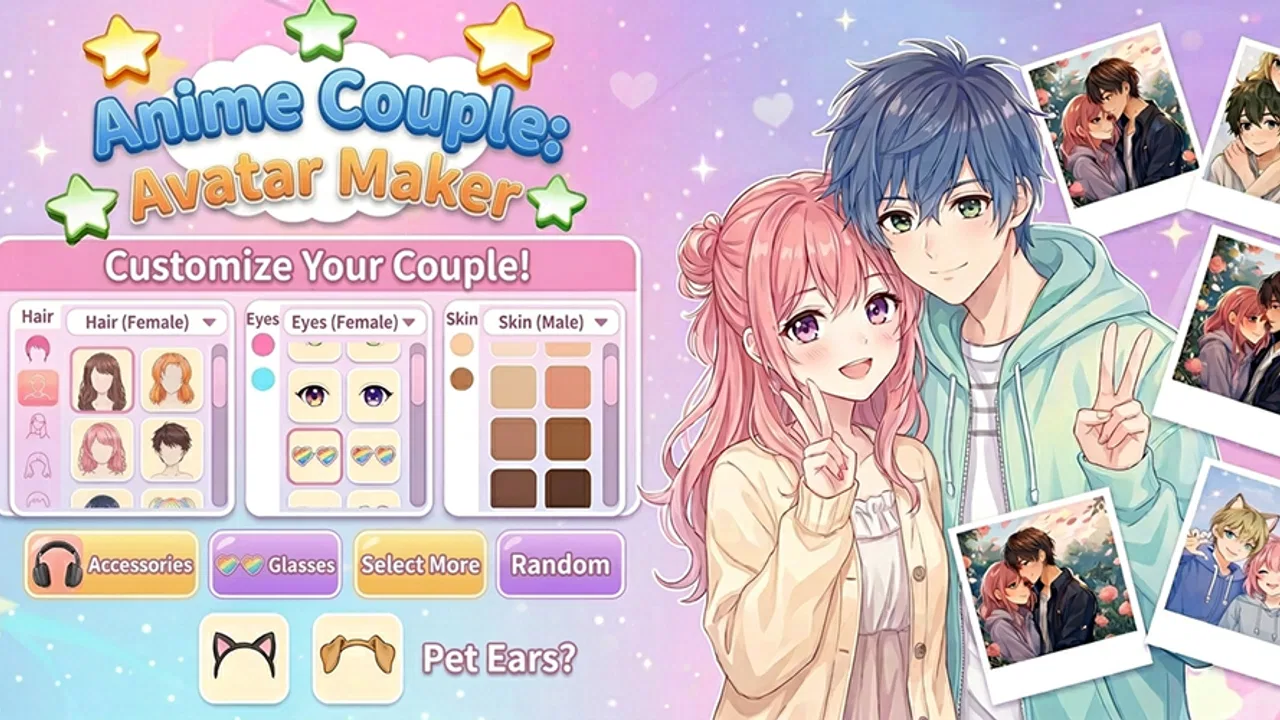
Anime Couple: Avatar Maker allows users to create customized avatars with a wide range of features, including hairstyles, facial expressions, clothing, and accessories. The app provides a vast selection of styles and colors, enabling users to craft unique and personalized anime couples. It also includes themed backgrounds to complete the scene.
02Is Anime Couple: Avatar Maker free to use?
Anime Couple: Avatar Maker is available for free with basic features. However, there are in-app purchases available for users who want to unlock premium content, such as exclusive items and advanced customization options. This allows users to enhance their avatars and explore additional creative possibilities.
03Can I save and share my creations from Anime Couple: Avatar Maker?
Yes, you can easily save your creations to your device's gallery and share them with friends or on social media platforms. The app provides high-resolution export options, ensuring that your avatars look great whether you're printing them out or sharing them digitally.
04Is Anime Couple: Avatar Maker suitable for children?
Anime Couple: Avatar Maker is designed to be family-friendly, making it suitable for children and adults alike. The app does not contain any inappropriate content, and its user interface is straightforward and easy to navigate, ensuring a fun and safe experience for younger users.
05Does Anime Couple: Avatar Maker require an internet connection?
Anime Couple: Avatar Maker can be used offline, allowing users to create avatars anytime and anywhere without needing an internet connection. However, accessing certain features, such as downloading additional content or sharing creations online, may require connectivity.
Pros
- Highly customizable avatars.
- User-friendly interface.
- Wide range of outfits.
- Regular updates with new items.
- Free to use with optional purchases.
Cons
- Limited male avatar options.
- Ads can be intrusive.
- Some items require purchase.
- Occasional app crashes.
- Limited background choices.

Anime Couple: Avatar Maker
Gallery